When a client has a support person.
Recognise and collaborate with a support person
How to recognise when a client has invited a support person to give input in Innowell.
How support-person input is shared
Once a client has created their Innowell account from their invitation email, they can invite a support person.
The support person receives an email asking them to complete a short questionnaire about how the client is doing. Once submitted, their responses appear in Innowell as another perspective for the care team.
The support person does not see the client’s information in Innowell. They only complete the questionnaire they have been invited to answer.
The support person never sees or interacts with the client’s data. They only answer the questionnaire.
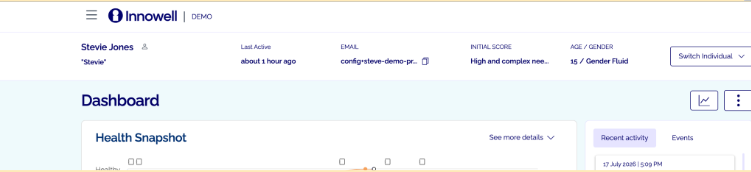
When you see the person icon beside a client’s name, it means a support person has been added to their Innowell account.
Using their input
Support-person input can also be helpful when a client needs support to share information in Innowell. This may be due to their age, capacity, access to a device, or other circumstances. In these situations, the support person’s questionnaire helps the care team maintain a clearer picture of how the client is doing.