Innowell & Cliniko Integration
No retyping.
Innowell assessment results filed into your Cliniko system
Innowell’s Cliniko integration connects measurement-based care to the practice management software your allied health or mental health clinic already uses. Search for a client, pick the matching Cliniko record, and their details fill in automatically.
Talk to us aboutPractice management, built around clinical care.
Cliniko is cloud-based practice management software built for allied health and mental health clinicians. It was founded in Melbourne in 2011, when an osteopath grew frustrated with her clinic’s software and a developer set out to build something simpler. Today, practices around the world use Cliniko to manage appointment scheduling and online bookings, treatment notes, telehealth, and invoicing and payments in one place.
Like Innowell, Cliniko was built in Australia by people close to clinical practice. Through our integration, clinicians can bring measurement-based care into the system they already use to run their practice. Client details prefill from Cliniko, and completed assessments are filed straight back to the client’s record.
& Innowell
Find a client in Cliniko
First name: Alex
Last name: Morgan
Date of birth: 14 / 05 / 1990
Alex Morgan
14 May 1990 · Matching record
Search requires an exact first name, last name and date of birth match. The clinician picks from the results.
Completed Innowell assessment → Cliniko
Mental health assessment report.pdf
Attached to Alex’s Cliniko file
Illustrative workflow · Example client details
Innowell + Cliniko. One seamless workflow.
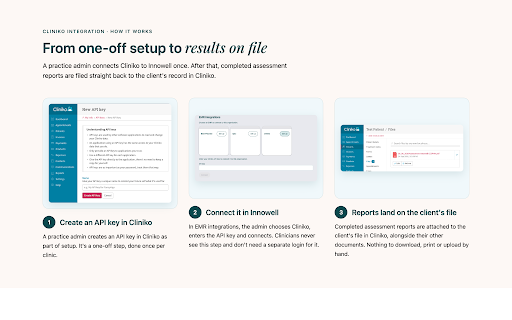
Connecting Cliniko is a one-off step: a practice admin completes it once per clinic during setup. Clinicians never see this step and don’t need a separate login for it. Completed assessment reports appear as an attachment on the client’s file in Cliniko, alongside any other documents uploaded for that client.
Practice admin · One-off setup
Create API key in Cliniko
Your practice admin creates an API key in Cliniko to connect the clinic’s account.
Practice admin · Once per clinic
Cliniko Setup in innowell
The admin enters the key in Innowell’s EMR integrations settings and connects. Clinicians never see this setup step.
Clinician · Everyday use
Assessment in Cliniko
In Innowell, search for and select the exact matching client, then invite a mental health assessment. Once the client completes it, the report is attached to their Cliniko file.
From client search
to a filed assessment.
Innowell & Cliniko · Integration walkthrough
Better together.
The Innowell Cliniko integration is built for mental health practices that already run on Cliniko. Your practice admin connects it once. From then on, clinicians send mental health assessments without retyping client details, and completed reports are attached to the client’s record in Cliniko automatically.
Connect once per clinic
Your practice admin connects the integration once. It’s built for mental health practices that already run on Cliniko.
No retyping client details
From then on, clinicians send mental health assessments without retyping the client details held in Cliniko.
Reports filed automatically
Completed assessment reports are attached to the client’s record in Cliniko automatically.
Talk to us about Cliniko
Talk to our team about connecting Innowell and Cliniko for your clinic. We’ll walk you through setup and answer your questions.
- info@innowell.org
- +61 2 9114 4400
- Level 8, 1 Central Avenue, Australian
Technology Park, Sydney