During a session: using client insights to guide conversations
Use shared data in the room and support assessments
Innowell gives you and the client a shared starting point, so sessions can move quickly into what matters most to them. It is not intended to replace the human connection, clinical judgement, or the client’s own story.
Keep the conversation human
Innowell is there to support the therapeutic conversation, not replace it.
There may be times when bringing a screen into the conversation helps you and the client look at patterns, changes, or priorities together. There may also be times when it feels more appropriate to stay fully with the conversation and return to the information later. Use your clinical judgement and the client’s comfort to decide when and how to bring Innowell into the session.
Use the shared picture when it supports the conversation
The Health Snapshot can be a useful shared reference point when it feels right to use it — a way to open with what has changed, what stands out, or what the client wants to focus on.
It works best as a tool for noticing patterns, supporting reflection, and grounding the conversation, rather than as an agenda for the session.
Decide together: in-session or scheduled
Decide with the client whether it is best to complete an assessment together during the session or schedule it for later.
- Do it together now: useful if the client would benefit from support, if the information feels important to explore in the moment, or if it has been a while since their last assessment.
- Schedule ahead: useful if the client is comfortable completing assessments independently and you want to agree on a regular cadence together.
This decision can be part of the therapeutic conversation. For example, you might say:
“Would it be helpful to look at this together now, or would you prefer to complete it later and we can come back to it next time?”
When a client has asked for assistance
A chat icon in the Individuals list means the client has requested assistance, such as support with completing their Initial assessment.
This can be a useful prompt to explore what support they were asking for and decide together how to approach it in the session. For example, you might say:
“You asked for some support with this, so let’s work through it together.”
Or:
“Let’s look at this together and see what feels most accurate for you.”
Giving your own input
From the three-dots menu, select Give input to complete the summary assessment from your clinician perspective. This is most likely done together with the client during a session. Used this way, it can support shared reflection on how things are tracking, where your perspectives align, and where there may be differences worth exploring.
The clinician view appears alongside the client’s responses in the summary graph. Seeing both perspectives together can help guide a more focused conversation while keeping the client’s experience at the centre.
Use this as a prompt for discussion, not as a correction of the client’s experience. You might say:
“Would it be helpful if we added my perspective together, so we can look at where our views line up and where there might be something useful to talk through?”
In some cases, you may also choose to complete clinician input separately, using your clinical judgement and the client context.
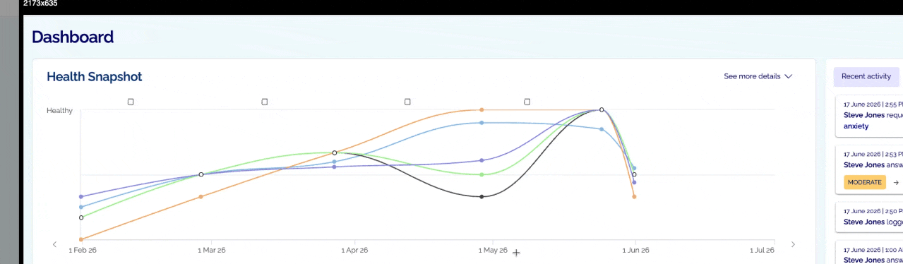
Give input can be used to complete the summary assessment together in session, helping the client and clinician reflect on how things are going as part of the conversation.